biGENIUS-X automates the most time-consuming parts of building a data warehouse: modeling, transformation logic and code generation. The generated code is native to your target platform, and you can choose how it gets there, without manual rework between environments.
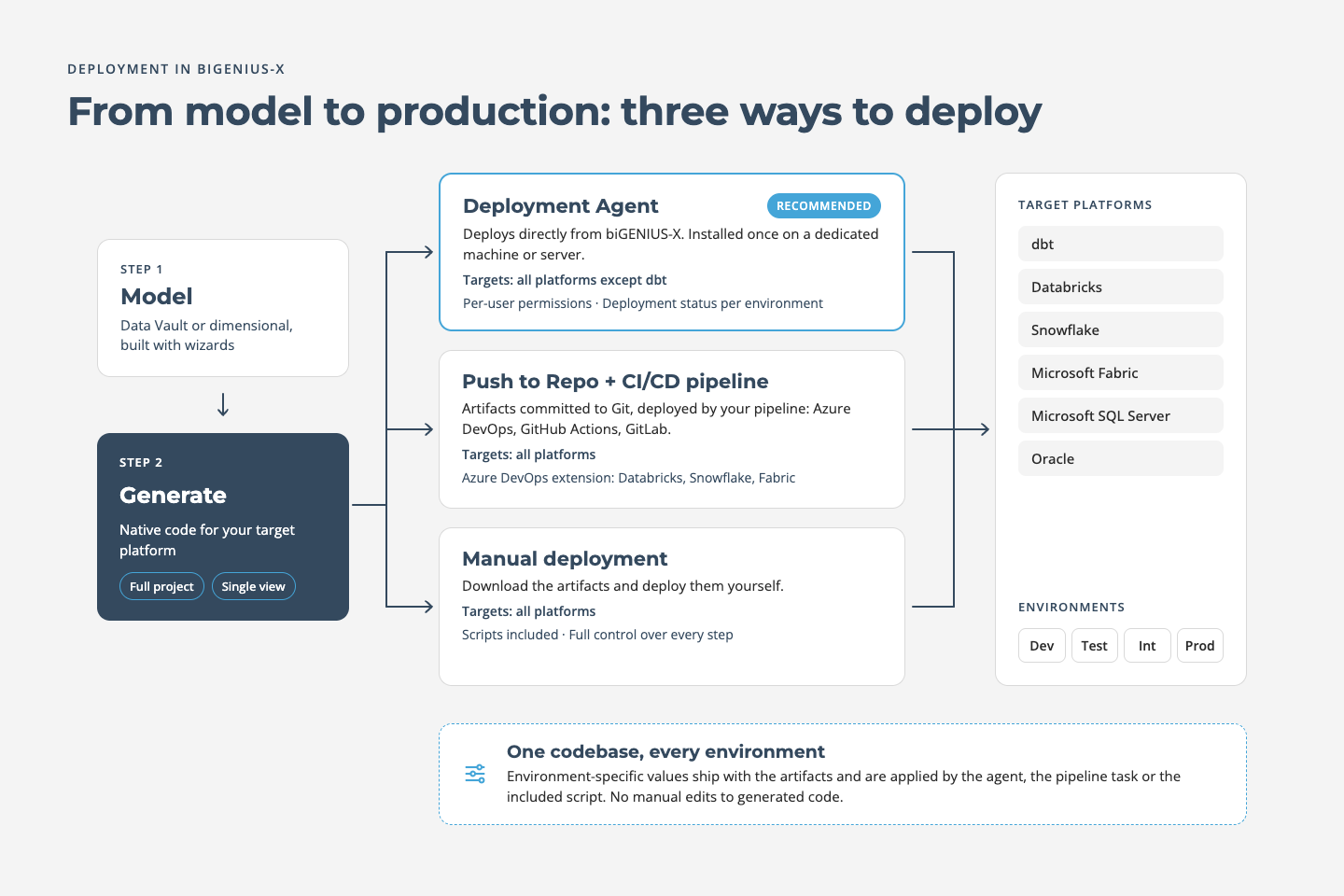
Depending on how your organization works, you can deploy in three ways:
- Directly with the Deployment Agent,
- Through your existing CI/CD pipeline, or
- Manually
You can also choose what to deploy: the full set of generated artifacts, or only part of your model. In biGENIUS-X, model objects can be grouped into Views and generated on their own. That is useful when your team is working on one area of the data warehouse and does not need to redeploy everything. The deployment process stays the same either way.
Deploy directly with the Deployment Agent
The Deployment Agent lets you deploy straight from biGENIUS-X, without a handover step in between. You install it once on a dedicated machine or server, where it holds the connection details for your target platform. From then on, deployments run directly from the application. If your team already works with Azure DevOps Pipelines or GitHub agents, the concept will be familiar.
Developers work independently
Deployment Agents can be authorized per user, so every developer can deploy to their own environment whenever they need to test something, without affecting anyone else's work.
You see what's deployed where
biGENIUS-X shows which branch was deployed to which environment, and whether the deployment succeeded or failed. No checking across tools, no asking around.
Deploy through your existing CI/CD pipeline
If your organization requires all code to go through a central release process, biGENIUS-X fits into it. Every biGENIUS-X project is backed by its own Git repository. With one click on Push to Repo, the generated artifacts are committed to your project branch. Your existing pipeline (Azure DevOps, GitHub Actions or GitLab) then picks them up and deploys them like any other code, to any biGENIUS-X target platform.
Reviews, approvals and release rules stay exactly where they are. No separate tooling, no additional approval path.
Ready-made tasks for Azure DevOps
For Azure DevOps, the free biGENIUS-X Deployment extension is available on the Visual Studio Marketplace. It adds pipeline tasks that deploy the generated artifacts directly into Databricks, Snowflake or Microsoft Fabric, with environment-specific parameters handled by the task itself.
Install the extension for free, add the task to your pipeline and you're set. No custom scripting required.
Get the biGENIUS-X extension on the Visual Studio Marketplace
Deploy manually
If you need full control, or your environment requires it, you can download the generated artifacts and deploy them yourself, for any target platform. The download contains everything you need:
- Native code for your target platform
- A configuration file for your environment-specific values, and
- A script that applies the values
One codebase, every environment
Environment-specific values (the settings that differ between Dev, Test, Int and Prod) ship with the generated artifacts in a separate configuration file. The same generated code can therefore be deployed to every environment without anyone editing it by hand.
You set these values once, and they are applied automatically: by the Deployment Agent, by the Azure DevOps pipeline task, or by the included script when you deploy manually. The result is fewer manual steps, no errors from environment-specific edits, and identical code from development to production.
Which option to choose
The Deployment Agent is the most direct route: it keeps deployment inside biGENIUS-X and gives you a clear overview of every environment. If your governance requires all code to go through a central release pipeline, use Push to Repo and your CI/CD tooling. And if you need full manual control, the generated artifacts are always available to download.